
AI Provider Service
What this service is for
Section titled “What this service is for”The AI Provider Service (zship-provider1-service) exists to solve two problems:
- Integration: Beyond core
node10-ai, it unifies external image / video / TTS APIs (KIE, WaveSpeed, …) behind one gateway — same auth, credits, and task model — so your product code does not sprawl with multiple SDKs and signing styles. - Operations: Async generation (callbacks, retries, refunds) is hard to run without admin tools. Testing, task logs, analytics, gallery, rate limits, and blocks are there so you can validate config, answer support, read usage, and enforce policy without shipping app releases for every change.
Supported providers
Section titled “Supported providers”| Provider | API | Typical capabilities |
|---|---|---|
| KIE | api.kie.ai | Image (nano-banana-2, Seedream), video (Kling, Wan), TTS (ElevenLabs), and more |
| WaveSpeed AI | api.wavespeed.ai | Image (nano-banana-2), video (Wan 2.6), editing, LoRA, and more |
Why: One place to manage multiple vendors — swap models or vendors mostly by configuration, not by branching product code.
Core gateway capabilities
Section titled “Core gateway capabilities”| Capability | Why we built it |
|---|---|
| No-code onboarding | Add models, change mapping or validation without a new web/admin release — shorter iteration and safer rollbacks when a model is misbehaving. |
| Credits | Tied to node1-auth so every task has traceable spend — easier refunds, reconciliation, and disputes. |
| Webhooks & R2 | Most providers are async; standard callbacks and file offload let dashboards and lists show stable results instead of every client inventing URLs. |
| Config-driven mapping | Absorb vendor-specific JSON (mapping, templates, strip lists) inside the gateway so the app sends business fields only. |
Testing (dedicated Provider test page)
Section titled “Testing (dedicated Provider test page)”| Tool | Why we built it |
|---|---|
| Dry run | Validate payload, mapping, validation, and credit estimate with no upstream call and no charge — catch misconfiguration before it burns credits in production. |
| Live test | Prove API keys, callback base URL, and connectivity with real HTTP; does not debit end-user credits — safe for destructive debugging. |
| Status lookup | Async jobs often stall in IN_PROGRESS; fetch by task id to see whether the bottleneck is upstream slowness, lost webhooks, or mapping bugs. |
| Webhook debugging | Wrong callback URLs look like “tasks never finish”; dedicated checks cut callback integration time sharply. |
Takeaway: Separate “is the config correct?” from “are we charging real users while experimenting?”
Task & log management (Providers → Tasks)
Section titled “Task & log management (Providers → Tasks)”| Tool | Why we built it |
|---|---|
| Searchable list | Support can find a run by email, task id, model, … without grepping raw application logs. |
| Per-task detail (stored requests/responses) | Keeps user payload, upstream request/response, errors, and credits for disputes, audits, and engineering repro (sensitive fields may be redacted by role). |
| Retry | Transient upstream/network failures are cheaper to replay the same request than asking users to click again; also verifies “after fixing config, does the same job succeed?”. |
Takeaway: Observability for async pipelines — without it you only see “failed”, not where it failed.
Statistics (inside Tasks)
Section titled “Statistics (inside Tasks)”| View | Why we built it |
|---|---|
| Overview | Totals, success/fail/in-flight, credits, distinct users — capacity and cost at a glance. |
| By provider | See which vendor is expensive, slow, or flaky — data for model choices and targeted throttling. |
| Filter by app_key | Split usage by project or tenant for billing, limits, and account reviews. |
Takeaway: Move from “it runs” to “we know how it runs and where money goes”.
Public gallery (Providers → Gallery + public GET /gallery)
Section titled “Public gallery (Providers → Gallery + public GET /gallery)”| Tool | Why we built it |
|---|---|
| User opt-in public | Separates shareable outputs from private generations — fewer privacy incidents. |
| Public list API | Marketing / campaign pages can show curated results in a grid without exposing R2 as a flat public file dump. |
| Moderation & featured | Community surfaces need policy review and editorial slots for campaigns and social proof. |
Takeaway: Turn raw task output into marketable, community-facing assets.
Security & abuse prevention
Section titled “Security & abuse prevention”| Control | Why we built it |
|---|---|
| Rate limits (scoped) | Protect upstream quotas and your credit economy from scripted abuse; per-key / per-provider / global scopes with 429 and retry hints. |
| API key blocks | When keys are stolen or misused, revoke at the gateway (per provider or wildcard) faster than code deploys. |
| IP & edge (Cloudflare) | The service enforces who uses which key; IP/geo/bot rules belong on Cloudflare WAF / custom rules and stack with the controls above. |
Takeaway: Keep an open API usable while bounding cost and abuse risk.
Purchase & setup
Section titled “Purchase & setup”Contact us to purchase the AI Provider Service. After purchase:
- Deploy
backend/zship-provider1-serviceto Cloudflare - Point admin’s
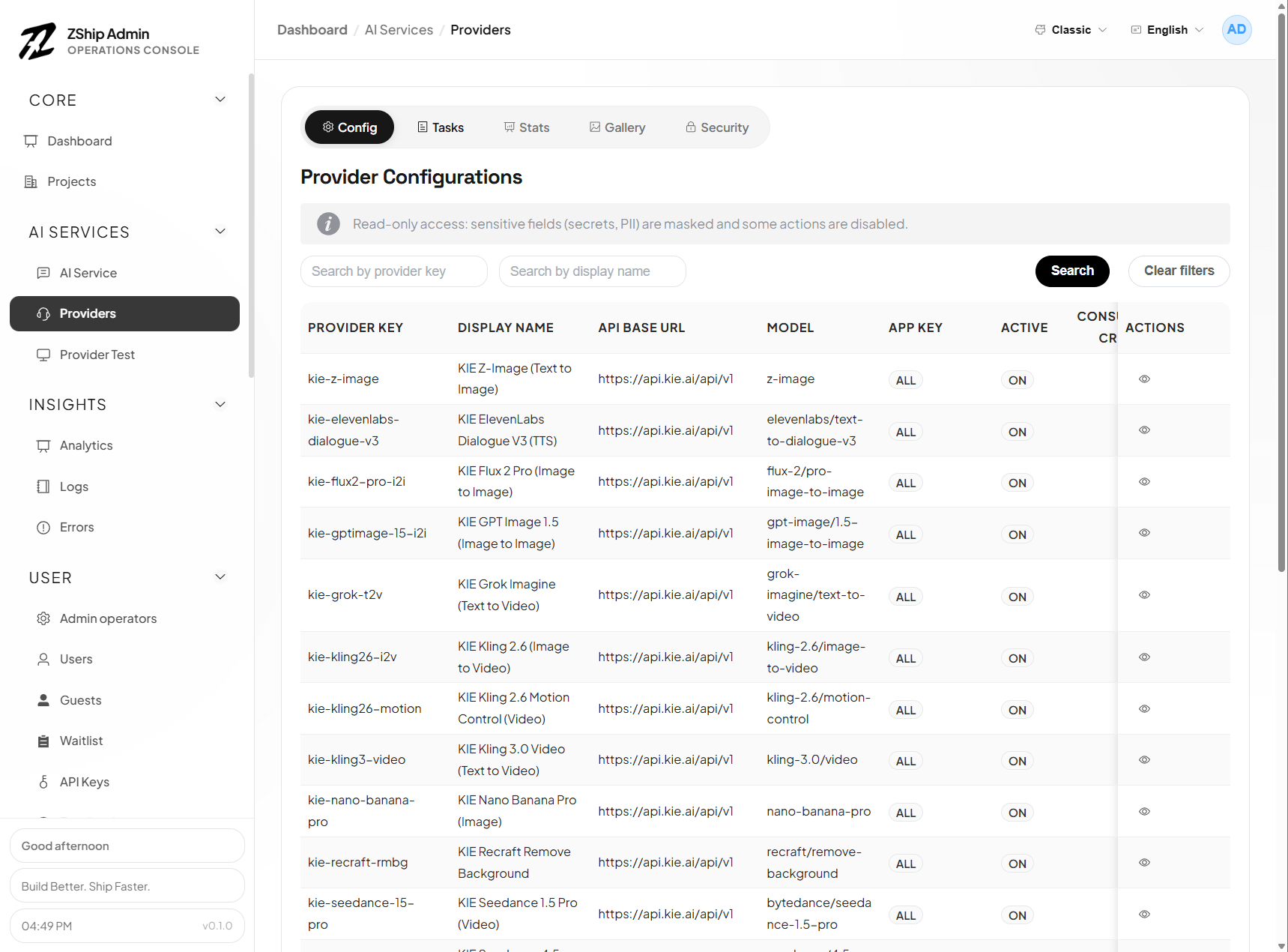
PROVIDER1_SERVICEbinding at your Worker - Configure providers (KIE, WaveSpeed, …) under Admin → Providers
Admin entry points
Section titled “Admin entry points”- Providers (
/providers) — config, tasks, stats, gallery, rate limits, blocks - Provider test (
/providers-test) — dry run, live test, status, webhook checks