
Admin RBAC & operator accounts
ZShip’s management console supports two ways to sign in (email/password or legacy secret). Passwordless flows (email magic link and customer demo links) are additional paths that still issue a normal admin JWT—see Passwordless access and platform settings.
| Mode | Login | JWT | Typical use |
|---|---|---|---|
| Legacy “super admin” | POST /admin/login body { "secret": "<ADMIN_SECRET>" } | No admin_kind: "operator", no permissions array | Bootstrap, break-glass, full access |
| Operator (RBAC) | POST /admin/login body { "email": "...", "password": "..." } | admin_kind: "operator" + permissions: string[] | Day-to-day staff with least privilege |
Everything below focuses on operators and how permissions are enforced. Legacy admins are intentionally all-powerful: treat ADMIN_SECRET like a root password.
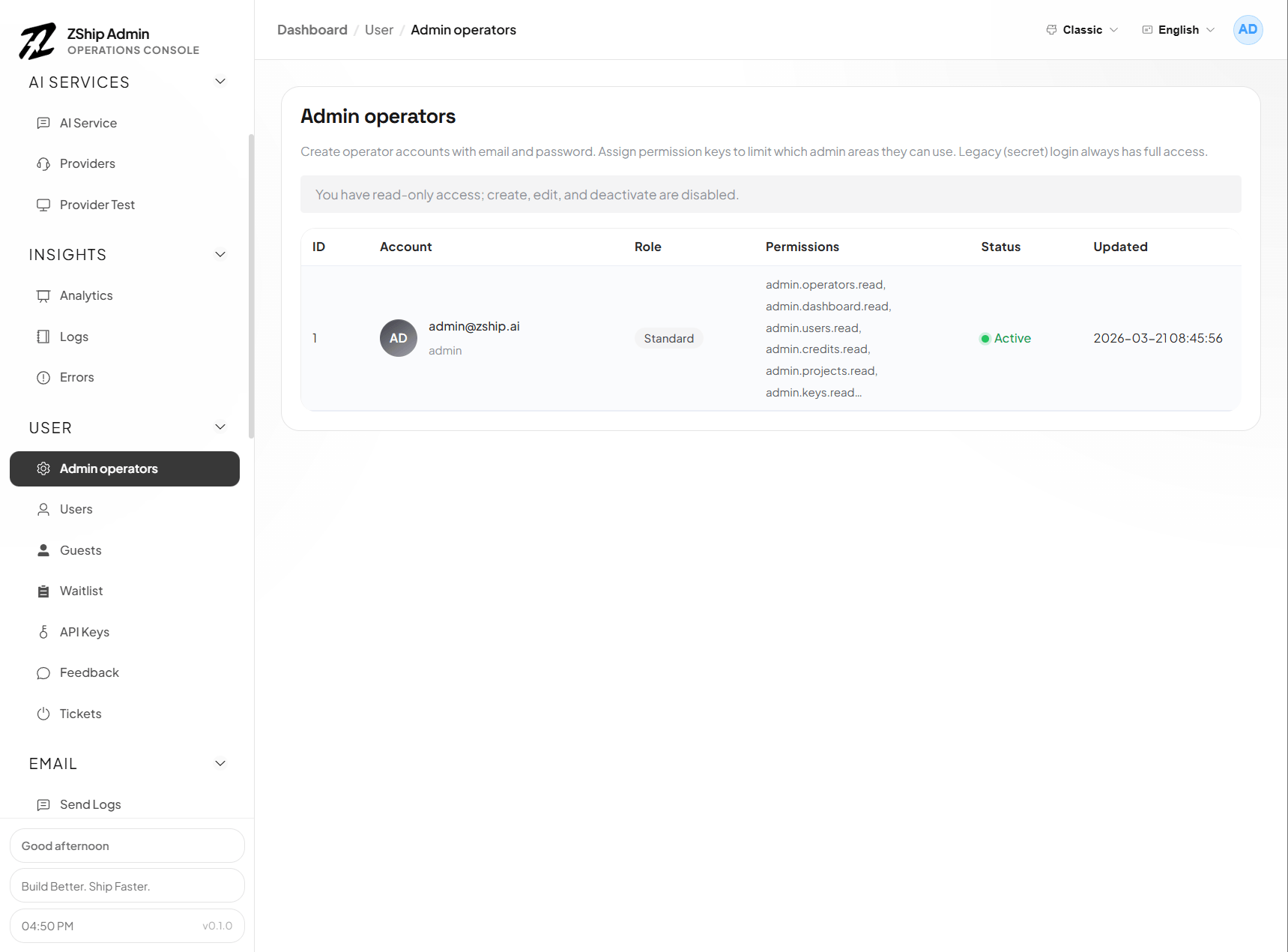
Use case: let people observe operations without mutating data
Section titled “Use case: let people observe operations without mutating data”When someone needs to see how the system is running (dashboards, analytics, logs, user lists, etc.) but must not freely edit or delete production data or critical settings, create an operator (RBAC) account instead of sharing ADMIN_SECRET.
In Admin operators (usually /operators), create the user and grant admin.<module>.read (read-only) for the modules they need—commonly dashboard, logs, users, and so on—then add .write or bare admin.<module> only where changes are truly required. For read-only access, many APIs redact sensitive fields (see Read-only operators and sensitive data below).
When access should end, an admin with admin.operators.write can deactivate or delete the operator or tighten permissions; the user typically needs to sign in again for JWT changes to apply. There is no automatic time-based expiry—you control scope explicitly through accounts and permission strings.
Permission strings
Section titled “Permission strings”Operators carry a JSON array of permission keys on the JWT (and in D1 as t_admin_operator.permissions).
Common patterns:
admin.<module>— full access to that module (read + write style routes), backward compatible.admin.<module>.read— list/detail style admin APIs only.admin.<module>.write— create/update/delete style admin APIs (often also allows read routes in practice via shared guards; write is the stricter gate for mutations)."*"— super-operator: every module (still an operator account, not legacy secret).
Module ids must align with the backend catalog, for example:
dashboard, users, credits, projects, keys, logs, verifications, guests, oauth, referrals, operators, plus cross-service surfaces such as pay, support, blog, notify, cdn, site, prompt, checkin, provider, core.
Authoritative constants live in the template repo at backend/node1-auth-service/src/constants/admin-permissions.ts (ADMIN_ROUTE_ACCESS maps each POST /admin/... path to { module, need: 'read' | 'write' }).
Where enforcement happens
Section titled “Where enforcement happens”- node1-auth-service — verifies JWT on
/admin/*(except login/me). Operator JWTs must satisfy the route’s module + read/write requirement. - Other Workers (pay, support, checkin, provider, …) — use service bindings +
requestAuthService/adminJwtAnyOfForModuleand their own route tables; same permission strings. - Admin UI (
nuxt-admin-layer) —canReadModule/canWriteModulehide or disable controls; server checks and response redaction still win if someone calls APIs directly.
Read-only operators and sensitive data
Section titled “Read-only operators and sensitive data”If an operator has only .read on a module (no .write and no bare admin.<module>), many list/detail APIs redact secrets and PII (masked emails, placeholder secrets, etc.). Implementation is centralized in packages/backend-utils/src/admin-sensitive-redact.ts; the repo doc docs/rbac/redaction.md lists endpoints and fields.
Adding operator accounts (recommended path)
Section titled “Adding operator accounts (recommended path)”Prerequisites
- D1 migration applied so
t_admin_operatorexists (backend/node1-auth-service/migrations/0011_admin_operators.sqlin the template).
Using the admin UI
- Sign in as a legacy super admin (
ADMIN_SECRET) or an operator that already hasadmin.operators(or*). - Open Admin operators (route
/operatorsin apps that extendnuxt-admin-layer). - Create a user: email, password (minimum length enforced by API), and select permissions (the UI mirrors the catalog).
First operator when you only have ADMIN_SECRET
- Log in with the secret once.
- Use Admin operators to create real accounts; then prefer operator login for routine work and keep
ADMIN_SECRETin a vault.
Bootstrap via SQL (advanced)
If you must insert the first row by hand: store bcrypt password_hash compatible with node1-auth-service (hashPassword in src/utils/password.ts), and set permissions to a valid JSON array string, e.g. ["admin.dashboard","admin.users.read"]. Wrong hashes or malformed JSON will break login. Prefer the UI when possible.
Managing the operators module
Section titled “Managing the operators module”admin.operators.read— list operators.admin.operators.write— create, update, deactivate/delete operators.
Without admin.operators, operators cannot open the operators page or call those APIs.
Passwordless access and platform settings
Section titled “Passwordless access and platform settings”Where in the UI
Section titled “Where in the UI”In apps that extend nuxt-admin-layer, the sidebar Admin group includes:
- Admin operators — route
/operators; create and manage operator accounts (requiresadmin.operators). - Platform settings — route
/login-settings; configure the public admin URL, email magic link, and customer demo links (sameoperatorsmodule permission as operator management).
What “platform settings” covers
Section titled “What “platform settings” covers”- Public admin URL — Ensures magic-link emails and demo-link previews use the correct
https://…origin. Values may come from the settings store (D1) and/or the auth Worker envADMIN_PUBLIC_ORIGIN(see Domains & environment). - Email magic link — When enabled, a user enters a registered operator email on the login page and requests a one-time sign-in email. The backend resolves
t_admin_operatorby email; verification issues an operator JWT (admin_kind: "operator"), equivalent to password login for RBAC. - Customer demo links — Long-lived passwordless URLs (
?demo_token=…on the admin login page). Two modes at creation time:- Classic demo — Internal demo identity (
admin_kind: "demo") with permissions stored on the demo-link row (default is dashboard read-only). - Bound to an operator (optional) — Bind an active operator; exchanging the token issues an operator JWT with that account’s permissions at exchange time, and includes
demo_link_idso revoking the demo link invalidates the session on the next authenticated API call.
- Classic demo — Internal demo identity (
JWTs and permission changes
Section titled “JWTs and permission changes”- Admin JWTs (password, magic link, demo link) embed permissions at issue time. Editing an operator’s permissions does not refresh an existing session until the JWT expires or the user obtains a new token (new login, new magic link, or new demo-token exchange).
- Revoking a customer demo link blocks sessions that were issued from that link immediately at the API layer (while the JWT might still be unexpired).
Security notes
Section titled “Security notes”- Demo links bound to powerful operators are sensitive: they approximate sharing that operator’s access for the JWT lifetime (often long for demo TTL). Use narrow operator accounts for external demos when possible.
- Classic demo URLs are not one-time by default; the same
demo_tokencan be exchanged again until the link is revoked or optional expiry is reached.
Related D1 migrations (node1-auth-service)
Section titled “Related D1 migrations (node1-auth-service)”- Operators table:
0011_admin_operators.sql - Demo links table:
0014_admin_demo_link.sql - Optional operator binding on demo links:
0015_admin_demo_link_operator.sql
Practical tips
Section titled “Practical tips”- Prefer narrow permissions (
*.read+ a few*.write) over*for contractors or support. - Remember legacy login bypasses RBAC entirely; protect
ADMIN_SECRETand rotate if leaked. - After permission changes, the operator may need to log in again to get a fresh JWT.
See also
Section titled “See also”- 06. Initialize your system — first login with
ADMIN_SECRET - Template reference:
backend/node1-auth-service/README.md(section on operators & RBAC) - Template reference:
docs/rbac/redaction.md(read-only response redaction matrix)