
Cloudflare Introduction
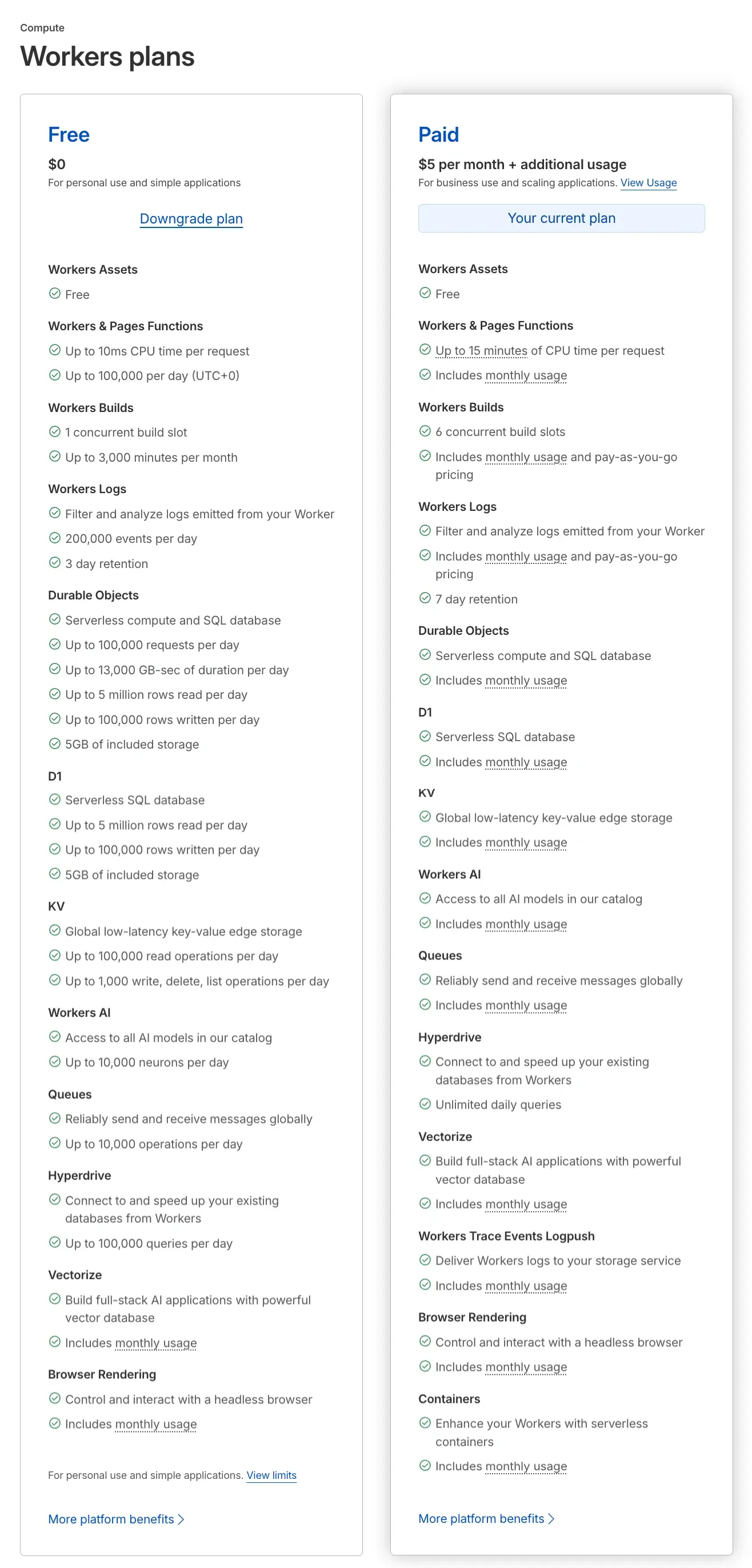
Cloudflare Workers: Free vs Paid ($5/mo)
Section titled “Cloudflare Workers: Free vs Paid ($5/mo)”The core differences between the Free and Paid plans come down to performance limits, concurrency, logging, and whether the plan is truly production-ready.
1. CPU Time Limit — The Biggest Difference
Section titled “1. CPU Time Limit — The Biggest Difference”This is the single most important distinction and determines what kind of workloads you can run.
| Free | Paid ($5/mo) | |
|---|---|---|
| CPU time per request | 10 ms | 15 minutes |
Free plan — limited to ultra-lightweight logic:
- API proxy / routing
- Simple auth checks
- KV reads
Paid plan — unlocks real workloads:
- AI inference & LLM agents
- Complex computation
- Long-running tasks
- Image / video processing
[!NOTE] For any AI SaaS product (including ZShip), the Free plan’s 10 ms CPU limit is not sufficient.
2. Request Volume
Section titled “2. Request Volume”| Free | Paid | |
|---|---|---|
| Requests | 100,000 / day (~3M / month) | Usage-based (unlimited) |
3. Build Concurrency (CI / Deploys)
Section titled “3. Build Concurrency (CI / Deploys)”| Free | Paid | |
|---|---|---|
| Build slots | 1 | 6 |
If you’re running multiple Workers or services, the Paid plan’s parallel builds make deployments significantly faster.
4. Logging & Debugging
Section titled “4. Logging & Debugging”| Free | Paid | |
|---|---|---|
| Log retention | 3 days | 7 days |
| Events | 200K / day | Usage-based |
Essential for production debugging and error tracing.
5. Storage Resources (KV / D1 / Durable Objects)
Section titled “5. Storage Resources (KV / D1 / Durable Objects)”All storage primitives are available on both plans, but the Free tier has tight quotas.
| KV Operations | Free | Paid |
|---|---|---|
| Reads | 100K / day | Usage-based |
| Writes | 1K / day | Usage-based |
6. Workers AI
Section titled “6. Workers AI”| Free | Paid | |
|---|---|---|
| AI quota | 10,000 neurons / day | Usage-based |
7. Hyperdrive & Vectorize
Section titled “7. Hyperdrive & Vectorize”| Free | Paid | |
|---|---|---|
| Availability | Limited quotas | Fully production-ready |
8. Summary: Which Plan Do You Need?
Section titled “8. Summary: Which Plan Do You Need?”| Use Case | Free | Paid |
|---|---|---|
| Learning & prototyping | ✅ | ✅ |
| Personal projects | ✅ | ✅ |
| Small demos | ✅ | ✅ |
| SaaS products | ❌ | ✅ |
| AI services | ❌ | ✅ |
| Production environments | ❌ | ✅ |
9. Recommendation for ZShip
Section titled “9. Recommendation for ZShip”A project with this architecture requires the Paid plan:
- 10+ Workers
- AI Gateway
- Queues, D1, KV
- Check-in & notification services
Operations like OpenAI API calls, LLM routing, payment logic, and AI gateway processing will easily exceed the 10 ms CPU limit.
10. Real-World Cost
Section titled “10. Real-World Cost”[!TIP] Many SaaS products running on Cloudflare Workers only spend $5–15 per month — the compute is incredibly affordable.
The Paid plan starts at a $5/mo base fee plus usage-based charges. For most early-stage products, the total cost stays remarkably low.
The Bottom Line
Section titled “The Bottom Line”Free plan = Demo · $5 plan = Production